A front desk for your clinic, around your prescription.
Your receptionist gets a login of their own to register patients, book them into slots, call them on the TV and take vitals. They print the prescriptions you sign and give the bills. You see who is waiting, and prescribe.
On Standard and Pro, and the 14-day trial. Standard ₹349 a month, Pro ₹649.
Today
Arrived and waiting
In the order they came. Signing their prescription takes them off.
- Prescribe
Meera GhoshNew
AR-0051 · 34 y · F · Waiting since 10:05 am, marked by Mitali Saha
BP 118/76 · Pulse 72 · Wt 58 kg
Bill ₹500 · paid
- Prescribe
Ramesh KumarAllergy
AR-0042 · 52 y · M · Waiting since 10:12 am, marked by Mitali Saha · booked for 10:15 am
BP 148/92 · Pulse 84 · Temp 99.1 °F
Bill ₹650 · paid
- Prescribe
Sunita Das
AR-0017 · 61 y · F · Waiting since 10:20 am, marked by Mitali Saha
BP 132/84 · Sugar RBS 142
Billing
Booked for today
4 more, not here yet
New patient
Arjun Mehta98300 54321Here nowBook a visitRegister patient- assistant logins on Standard, at one clinic
- 2assistant logins on Standard, at one clinic
- on Pro: three logins at each of up to five clinics
- 3 × 5on Pro: three logins at each of up to five clinics
- languages the TV calls the token in
- 11languages the TV calls the token in
- of signed prescriptions the desk prints without asking
- 30 daysof signed prescriptions the desk prints without asking
01The desk’s day
From the door to your chamber, without a register book.
The desk and your chamber work on the same list. What they enter is on your screen at once, and what you sign is at their printer.
- 01
Register, or find
A new patient in ten seconds, with a patient ID of their own. Anyone else by name, mobile or ID. Registering asks whether they are here now or booked for another day.
- 02
Mark arrived
From the booking, the registered list or the patient’s page, into today’s slot, with a token if your clinic calls patients by number.
- 03
Take the vitals
BP, pulse, temperature, weight and the rest, already on the prescription when you open it.
- 04
Call them in
Call next on Today or at the desk: the TV chimes, shows the token and says it. Arrived and waiting stays in the order they came.
- 05
Print, bill, book
Signing marks the consultation completed. The desk prints it with the bill, and books the next visit up to a year ahead.
02Bookings and slots
Slots that keep up when the OPD runs late.
Set your slots once. The desk books into them, and when patients wait past their time, every later slot shows when it is now likely to be seen.
- Your slot length (5 to 30 minutes), up to three sessions a day and how many patients a slot
- New and Follow-up marked on every booking, a tick once they arrive
- A daily limit and closed days if you want them. Limits only warn: the desk can book anyway
- Change this day, by you or the desk: other hours on one date, slots blocked off, or the day closed
- Follow-ups due that day and not booked, listed beside the slots to book in one tap
- A calendar that shows how many are booked each day
Saturday, 7 November
SlotsListRunning about 15 minutes late. Each later slot shows when its patients are now likely to be seen.
Morning · 10:00 am to 1:00 pm · 15 minutes a slot
10:00
Ramesh Kumar
10:15
Meera Ghosh
10:30
Sunita Das
10:45≈ 11:00
Anil Roy
11:00≈ 11:15
Priya Nair
11:15≈ 11:30
Free
11:30≈ 11:45
Arjun Mehta
11:45≈ 12:00
Free
Rao Family Clinic
Dr. Ananya Rao · Room 1
10:42
Saturday, 7 November
Now calling
9
Sunita D.
Please go to Room 1
Next
- 10
- 11
- 12
- 14
Please keep your phone on silent in the waiting room.
RxKite
03The waiting-room TV
Nobody shouts names in the waiting room.
A TV shows who is called and who is next, and says each token aloud as the desk or you press Call.
- Any TV with a web browser opens rxkite.com/tv and connects with a 6-digit code
- Call next: a chime, the token shown large, and said aloud
- English, Hindi, Bengali, Marathi, Gujarati, Punjabi, Tamil, Telugu, Kannada, Malayalam or Odia
- Speak on the TV: say a few words and it plays your own voice
- Token numbers only to start with; names shown or said only if you turn them on
04Desk printing
Sign in your chamber. It prints at the front desk.
Keep the printer at the desk. When you sign, the prescription is on the desk’s list with a Print button, and the patient collects it with the bill on the way out. A patient back for an old prescription gets it printed at the desk too.
- Only the assistants you allow, with a switch for each under Front desk → Assistants
- It prints exactly as you signed it: medicines, doses and everything else are locked
- Your uploaded signature and stamp, for a patient who takes it home now, or a space for you to sign in ink
- On the pad you choose, if you have more than one
- Signed in the last 30 days prints at once. For an older one the assistant asks, and once you allow it, it prints for the next 24 hours
- Every print recorded under the assistant’s name
Print AR-2026-00137
Signed by Dr. Ananya Rao on 29 Oct 2026, 10:42 am at Rao Family Clinic. It prints exactly as Dr. Ananya Rao signed it.
Print on
A4 pad05Fees and bills
Bills, part payments and dues, kept straight.
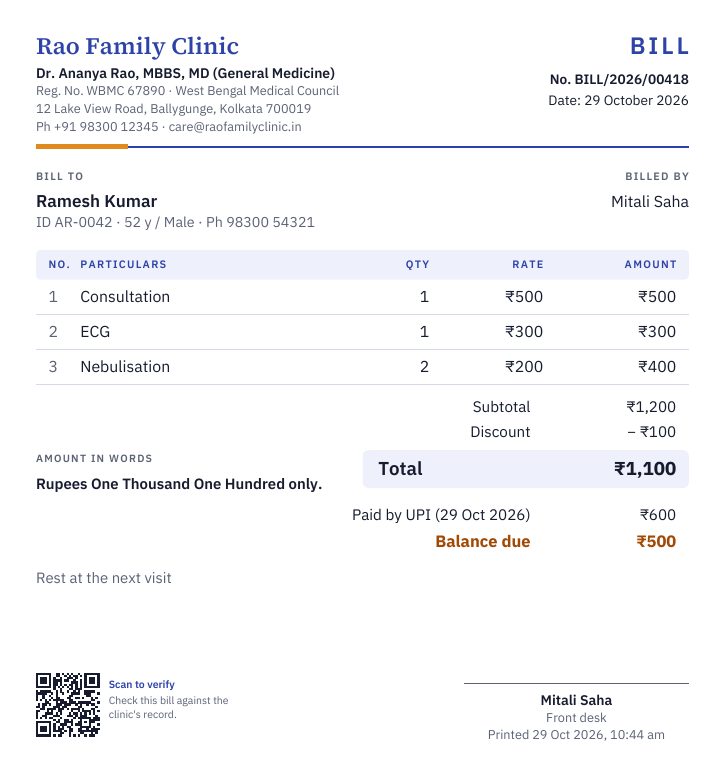
You, or an assistant you allow, give a numbered bill in a few taps. What is not paid shows on the patient’s page, on Today and under Dues until it is. RxKite never handles the money: it keeps the record.
- Your charges kept once, up to 500, found by search; star the usual ones for one tap
- A discount in rupees or a percent, and a note if you need one
- Paid now by cash, UPI or card, in full or in part; the rest stays due
- Dues collected at a later visit, against the oldest bills first, with a numbered receipt
- Your logo, registration number and a QR code anyone can scan to check the bill
- Only you cancel a bill, with a reason. It is never deleted and keeps its number
- The month’s takings by cash, UPI and card, dues still owed, and two spreadsheets for your accountant
Collected today
₹12,050
Cash ₹4,200 · UPI ₹6,850 · Card ₹1,000
06Several clinics
Every chamber you sit in, on one login.
- Up to 5 clinics, switched from the sidebar; each browser remembers where it works
- Each clinic has its own arrived, booked and registered lists, its own slots and TV, and its own day of bills
- Up to 3 assistant logins for each clinic; each assistant works at all your clinics or the ones you tick
- A pad for each clinic, or one pad that lists every clinic at the top or bottom
- Patients, prescriptions, templates and your medicine library are shared: one record per patient
Rao Family Clinic
Working at
- Rao Family ClinicBallygunge, KolkataPrimary
- Mitra ClinicBehala, Kolkata
- Salt Lake ChamberSector V, Salt Lake
07You stay in charge
What an assistant can do, and what they never can.
An assistant can
- Register patients, and fill in details that are empty
- Mark patients arrived, enter vitals and book visits
- Call patients on the TV
- Print the prescriptions you have signed, if you allow it
- Give bills and collect dues, if you allow it
- Share a patient’s page with you, which only your sign-in opens
- Work for several doctors on one login
An assistant never can
- Write, change or sign a prescription
- Open a draft, the patient’s documents or your private notes
- See your plan, your settings or the month’s totals
- Change a detail already entered, or cancel a booking, without your approval
- Change your slot settings
- Cancel a bill or a receipt
- Keep working at your desk once you lock them out
Each assistant signs in with their own email and a code, and everything they do is recorded under their name. Changes waiting for you are under Front desk → Review, and you can lock an assistant out at once.
From doctors who use it
What doctors say
“As a new doctor, RXkite has been an absolute game-changer! ❤️ I don’t even have a physical prescription pad yet, and earlier, I had to write prescriptions and investigations on plain paper or WhatsApp. Now, I can create professional prescriptions, customise them effortlessly, and share them digitally or print them whenever needed. It’s incredibly user-friendly, convenient, and the pricing is almost unbelievably affordable! Honestly, I love everything about it. Highly recommended for doctors looking for a simple, efficient, and affordable prescription solution!”
RX Kite is excellent, excellent software, professional, and easy to use. Customer support very good. Highly recommended! ⭐⭐⭐⭐⭐ Thank you, RX Kite Team!
Questions doctors ask
The clinic, answered
The front desk, bookings, the TV, desk printing and bills come with Standard and Pro, and the 14-day trial; several clinics with Pro. Lite and Starter have the prescription on its own. Compare plans.
I use another clinic software. Can I move?
Yes, and you can keep your printed pads. Setting up takes about ten minutes: your details, your pad and one test print; then invite your assistant by email. Patients are added as they come in, by you or at the desk. There is no way yet to bring in a patient list from other software, so earlier visits stay in your old software or on paper. Everything you write in RxKite downloads in full whenever you want, so you are never stuck again.
Can my assistant print the prescription I sign?
Yes, on the Standard and Pro plans, and during the trial, if you let them. Sign in your chamber and the prescription is ready on the front desk’s list: your assistant presses Print and chooses your uploaded signature and stamp, or a space for you to sign in ink. It prints exactly as you signed it, and they cannot change a word. Prescriptions signed in the last 30 days print at once; an older one waits for your OK. Every print is recorded under their name.
Can my assistant register patients?
Yes, on the Standard and Pro plans, and during the trial. Invite your assistants by email under Front desk: 2 on Standard, and 3 for each clinic on Pro. Each signs in with their own login to register patients, mark them arrived, with a token number if you want them, take their vitals and book visits, and you see who is waiting on your Today page in the order they came. Assistants never write or change prescriptions, or see documents, your private notes or your plan; you can let one print the prescriptions you have signed, to hand to the patient. Changes to details already entered wait for your approval, and everything they enter is recorded under their name. An assistant who works for several doctors on RxKite keeps one login.
Can the front desk give bills?
Yes, on the Standard and Pro plans, and during the trial: you, and any assistant you allow. Pick your charges with a tap, take a discount in rupees or a percent, and note what was paid by cash, UPI or card. Part payment is fine: the rest stays due and is collected at a later visit, with a receipt. Bills and receipts print with your logo, your registration number and a QR code anyone can scan to check them. Front desk → Bills shows the month’s takings by cash, UPI and card, with spreadsheets for your accountant. RxKite never handles the patient’s money.
Can I use it at more than one clinic?
Yes, up to 5 clinics on the Pro plan, and during the trial. Switch clinics from the sidebar. Each clinic has its own front desk lists and up to 3 assistant logins, and can have its own pad, or one pad can list every clinic. Patients, prescriptions, templates and your medicine library are shared, so a patient has one record wherever you see them.
Give your front desk its own login.
Start free, with 14 days of Pro and the front desk included. Set up your pad, then invite your assistant by email under Front desk.