Online consultations
Consult online. Send a signed prescription.
Video call or chat with your own patients from their page in RxKite. Then sign the prescription and email it as a PDF, with your signature and a verification QR. It is filed under the patient like every OPD visit.
- On every plan, including Free
- No app for the patient
- Encrypted, device to device
- Never recorded
Ramesh Kumar
Video call
Messages and files
Already seeing patients by phone?
Turn a WhatsApp follow-up into a proper consult.
Many doctors already take follow-ups on a phone call or a video call, then send a photo of a handwritten slip. RxKite keeps it just as easy for the patient, a link that opens in their browser, and gives you what a phone call cannot.
The prescription
Before: A photo of a handwritten slip
A typed PDF with your registration number, signature and a verification QR
Afterwards
Before: Lost in the chat history
Filed under the patient with every OPD visit, one search away
Reports
Before: Scattered in your phone’s gallery
Opened in the consultation, and kept as the patient’s documents if you choose
At the chemist
Before: Nothing to check it against
Scanned and checked against your signed record
How it works
Four steps, from the patient's page to their inbox.
- 1
Start from the patient’s page
Press Video call or Live chat on the patient’s page. Patients are registered once, as for any prescription, so their history is right there.
- 2
Send the link
By WhatsApp in one tap, by copying it, or as a QR code you photograph with your phone. It stops working when you end the consult, and after 3 hours at most.
- 3
Consult
The patient opens the link in their phone’s browser. Talk on video, or chat and share reports, and move between the two whenever you both agree.
- 4
Sign and email the prescription
Write it as you would in the OPD, sign, and press Email. The patient receives a PDF with your signature and a verification QR.
Video calls
Video calls that open in the patient's browser.
- No app or account for the patient. They open your link, see your name and clinic, and press Join the call.
- Mute, turn your camera off, or flip between the front and back camera.
- Rotate the patient’s picture a quarter turn when their phone sends it sideways.
- See the connection speed and delay while you talk.
- Share a photo or PDF during the call. It opens full screen, and the video shrinks to a miniature you can drag anywhere.
- A patient who cannot use video can join by chat only.
Rao Family Clinic
Video call with Dr. Ananya Rao
Private: your video and voice go directly to the doctor's device, encrypted end to end.
Join the call Join by chat onlyDr. Ananya Rao would like to switch to video. Your camera and microphone turn on only if you agree.
End the consultation with Ramesh Kumar
Save to the recordThe whole conversation is kept with this patient.Destroy the conversationNo words from it are stored anywhere.✓ blood-report.jpgFrom the patientLive chat
A live chat for reports, questions and follow-ups.
- Messages go straight to the other device, encrypted end to end.
- Patients send photos of reports or old prescriptions with the paperclip: JPG, PNG or PDF, up to 5 MB each.
- Photos and PDFs open inside the consultation, page by page, without downloading them.
- Need to see the patient? Ask to switch to video. Cameras turn on only when both of you agree, and either of you can go back to chat at once.
- When it ends, save the conversation to the patient’s record or destroy it, and keep the attachments you choose as the patient’s documents.
Digital prescriptions
The same prescription, signed and sent as a PDF.
- Written the way you write in the OPD: remembered medicines, templates and repeat last.
- Signing files it under your name and number. It cannot be edited afterwards, only voided with a reason.
- Your uploaded signature and stamp go on the PDF, since the patient cannot receive a hand-signed copy.
- Emailed from your name, with the PDF attached. Replies come to your clinic email.
- A verification QR and link let pharmacists check it against your signed record, and see if it was voided.
- No email address? Download the PDF and send it on WhatsApp, or share it in the chat.
Print on a pre-printed pad? Your paper carries your header, so a PDF made on that pad does not. The guide shows how to email prescriptions with your name and registration on them.
How to create and email a digital prescription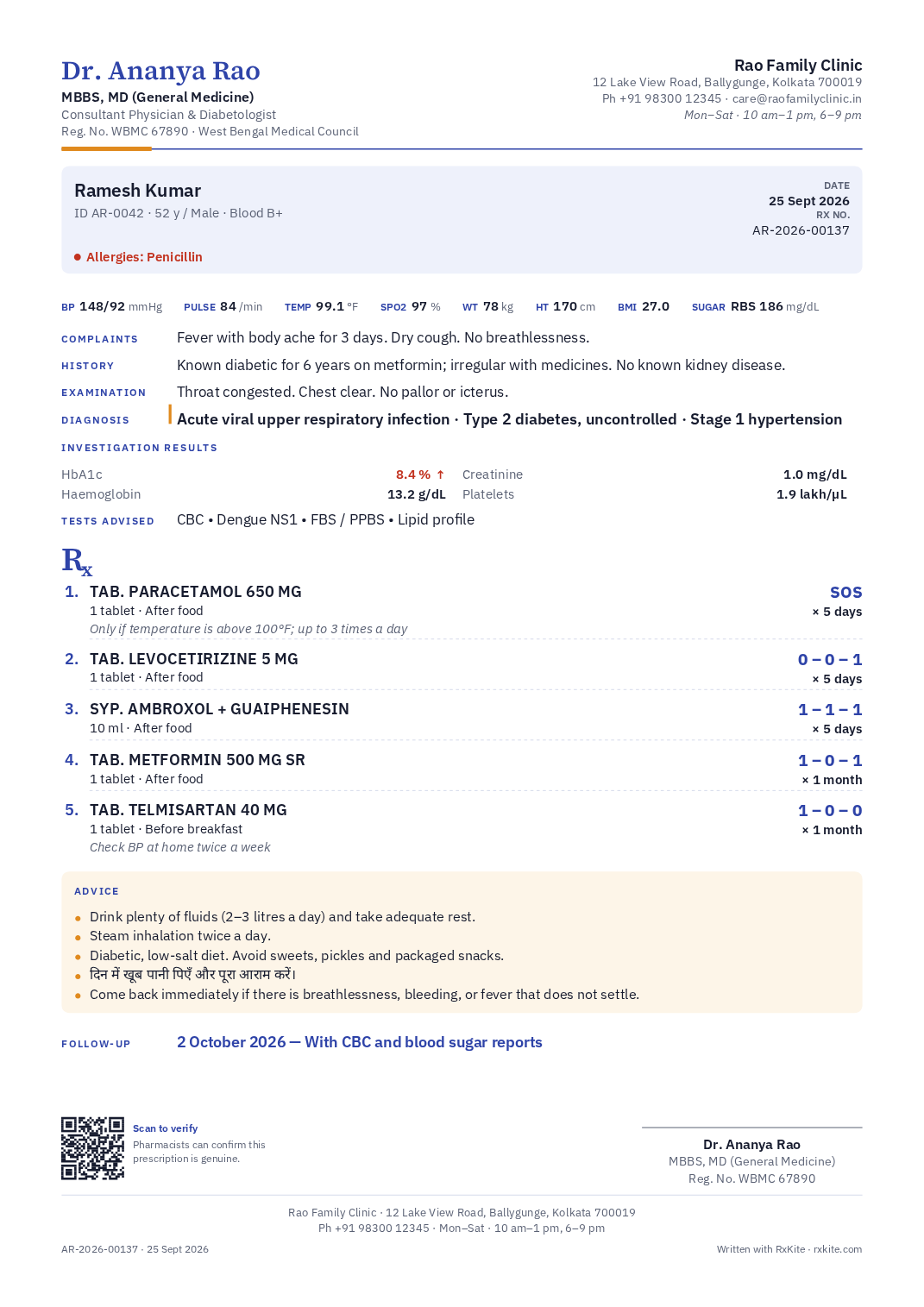
Dr. Ananya Rao via RxKite
Your prescription from Dr. Ananya Rao
RX-2026-00137.pdfPrivate by design
Between you and the patient, and nobody else.
- Video, voice, messages and files go directly between your device and the patient’s, encrypted end to end. They never pass through our servers.
- The link carries a private key that never reaches us. Our server only helps the two devices find each other, and cannot listen in.
- Calls are not recorded. A chat is kept only if you save it to the patient’s record.
- The link stops working when you end the consult, and after 3 hours at most.
- The patient’s page runs no visitor statistics and sets no cookies.
If a call cannot connect
There is no relay server, because a relay would carry the video. Some office, hospital and mobile networks block direct calls, so on those the call cannot connect. Switching from Wi-Fi to mobile data, or the other way round, usually helps. Chat uses the same direct connection.
What the patient sees
Your name and clinic, a note that the call is private, and a button to join by video or by chat only. When you end the consult, their page says so and nothing from it stays on their device.
01
Your patients, not a marketplace
Patients cannot find, book or pay doctors through RxKite. You consult people you already see.
02
No commission
RxKite never handles your consultation fee. Collect it the way you do today.
03
Not a full EMR
No booking, billing or clinic management. Just the consult and the prescription, filed under the patient.
04
Your clinical judgement
Whether a case suits a remote consult, confirming who the patient is, and what may be prescribed after one are your decisions, under the Telemedicine Practice Guidelines and your council’s rules.
Questions doctors ask
Online consults, answered
Step by step: video calls, live chat and digital prescriptions.
Does the patient need an app or an account?
No. They open the link you send in the browser on their phone or computer. Chrome, Safari and Firefox all work. For video, the browser asks once to use the camera and microphone.
Can I start with chat and switch to video?
Yes, either way. Either of you can ask for video from the Chat and Video switch. The cameras turn on only when the other person agrees, and either of you can go back to chat at once.
Is the call recorded?
No. Video and sound go directly between the two devices and never reach RxKite’s servers. A chat is stored only if you choose Save to the record when it ends.
How does the patient get the prescription?
Sign it and press Email: they receive it from your name, with the signed PDF attached and a link to verify it. If they have no email address, download the PDF and send it on WhatsApp or in the chat.
What if the call cannot connect?
Some office, hospital and mobile networks block direct calls, and there is no relay server, by design. Ask the patient to switch from Wi-Fi to mobile data, or the other way round, or phone them.
Does it cost extra?
Video calls and live chat are on every plan, including Free. A prescription you sign after an online consult counts towards your plan like any other.
Is it allowed under the Telemedicine Practice Guidelines?
RxKite gives you the call, the chat and the prescription. Whether a condition can be managed remotely, confirming who the patient is, and which medicines may be prescribed after a remote consult remain your decisions under the Telemedicine Practice Guidelines and your council’s rules.
Try it with your next follow-up.
Start with 14 days of Pro, free. The same account prints on your pad in the OPD and sends prescriptions after online consults.