Features
Everything RxKite does, in one place.
Less likely to forget. Less time to write.
The front desk, patient records, prescriptions, your pad and bills, part by part. The points doctors ask about first are marked in marigold.
- 3,65,036 Indian brands
- 9 ways to print the medicines
- Prints 11 Indian languages
- Bookings in slots and a TV
- Up to 5 clinics
01Templates and libraries
Write it once. Add it in one click.
Save a whole visit as a template, and the tests and advice you give together as one button. A busy OPD then takes clicks, not typing.
Less likely to forget
A template or a bundle brings every medicine, test and line of advice you saved, every time, however busy the day.
Less time to write
One click adds a fever profile’s five tests or your dengue advice, instead of typing each line again.
Add a template to this visit
- Viral fever — adult
- Type 2 diabetes — follow-up
- Acute gastroenteritis — child
- Hypertension review
- Allergic rhinitis
Save this visit as a template…
Diagnosis3 medicines2 tests4 lines of adviceFollow-upin one click
Investigations
Save to LibraryAdvised
CBC Malaria parasite (MP) Widal Urine R/M Dengue NS1 / IgM
+ Fever profile+ LFT+ Lipid profile+ HbA1c+ Chest X-ray PAMore (9) Edit list
Advice
Drink plenty of fluids (2–3 litres a day).
Paracetamol only for fever. No painkillers such as ibuprofen or aspirin.
Come back at once if there is bleeding, vomiting, pain abdomen or drowsiness.
+ Dengue care+ Low salt+ Warning signs+ Steam
Templates for a whole disease
Write a visit for viral fever, type 2 diabetes or gastroenteritis once and save it: complaints, examination, diagnosis, medicines with their doses, tests, advice and the follow-up note. Next time, pick it from Templates and it is all there.
Test bundles
Keep several tests under one button with a name of your own. + Fever profile adds CBC, malaria parasite, Widal, urine and the dengue test at once; a diabetes review or a pre-op workup can be one button too.
A template only adds
Whatever you already typed stays, and nothing is added twice, so fever and cough can be two templates on one visit. Then change anything for this patient before you sign.
Advice bundles
+ Dengue care adds every line you give for dengue: fluids, which painkillers to avoid, when to come back. Single lines such as a low-salt diet sit beside it.
Diagnoses and symptoms in a tap
Your usual diagnoses and complaints are buttons under each box. Fever × 3 days is kept as + Fever, so the duration stays yours to add.
Lists that fill themselves
Every test, line of advice, diagnosis and symptom you sign is counted, so the ones you write most come first. Until your own are there, common ones start you off.
Save to Library as you write
Wrote a good set of advice or tests? Save to Library keeps them, one by one or together under one name, without leaving the prescription.
Your own medicine list
Add medicines before you first prescribe them, with your usual dose, 1-0-1, timing, duration, a tapering dose and what they contain. Remove ones you no longer use, with Undo.
Templates: up to 200 on every plan. The Library comes with every plan.
02Writing
A prescription in under a minute.
The form on the left and the exact page that will print on the right. Fill only what you need: empty sections are not printed.
Medicines
- Tab Augmentin 625 Duo1 tablet · 1-0-1 · After food · 5 days · used 42×
- Medicine list
- Tab Augmentin 375Amoxycillin 250 mg + Clavulanic Acid 125 mg
- Syp Augmentin DDSAmoxycillin 400 mg + Clavulanic Acid 57 mg
Your medicines, with your dose
The first time you prescribe a medicine, it is remembered with its dose, 1-0-1, timing and duration. Type two letters and pick it: the rest fills in, the ones you use most first. A dose changed for one patient stays on their prescription.
3,65,036 Indian brands
Search by brand or by what it contains (amox clav). Each comes with its composition, printed small under the name.
Starred medicines, one tap
Star the medicines you give most in your Library and they wait under the form as buttons: one tap adds the medicine with your usual dose and duration. Until you star any, your most used show there.
Allergy warnings
A medicine that clashes with a recorded allergy is named before you sign, by its name, by what it contains and by drug family: a penicillin allergy warns for Augmentin.
BD becomes 1-0-1
The shorthand you already use: OD, BD, TDS, QDS, HS and ODAC fill in the 1-0-1. SOS, stat, alternate days and weekly are there too, or type your own.
Tapering doses
A tapering or increasing dose prints stage by stage, 20 mg then 10 mg then 5 mg, each with its days, and fills in again the next time.
Repeat the last visit
Repeat last starts today’s visit from the last signed prescription. Or, from the Last visit card beside the form, add its medicines (untick any you are stopping) or everything to what you have written, from any of the last three visits.
Complaints and diagnoses suggested
As you type, yours first, then common ones such as burning micturition or enteric fever.
Age and dose checks
Tramadol, codeine or nimesulide for a child under 12 is named, and so is a dose in tablets on an injection or syrup. A reminder to look again, never a block.
Drafts save themselves
Saved a couple of seconds after you stop typing, kept in the browser if the internet drops, and never overwritten by an older tab.
Keyboard shortcuts
Ctrl + N for a new prescription, Ctrl + K to find a patient, Ctrl + S to save and Ctrl + P to sign and print.
Valid till
Set how many days the pharmacy may dispense it: it prints highlighted under the follow-up.
Radiology in words
X-ray, ultrasound and ECG findings have a box of their own and print under the examination.
A Plan under the diagnosis
Surgery planned, the next steps: a box of its own, printed under the diagnosis.
Extras for your specialty
A glasses prescription with vision and IOP for each eye, pregnancy dates with the EDD and weeks worked out, and body diagrams to mark where to operate. Your specialty turns them on; any doctor can.
03Your pad
It prints like your clinic’s own pad.
Keep your pre-printed pads, upload a letterhead you made in Canva, or design one here in your colours. You change any of it yourself, whenever you like.
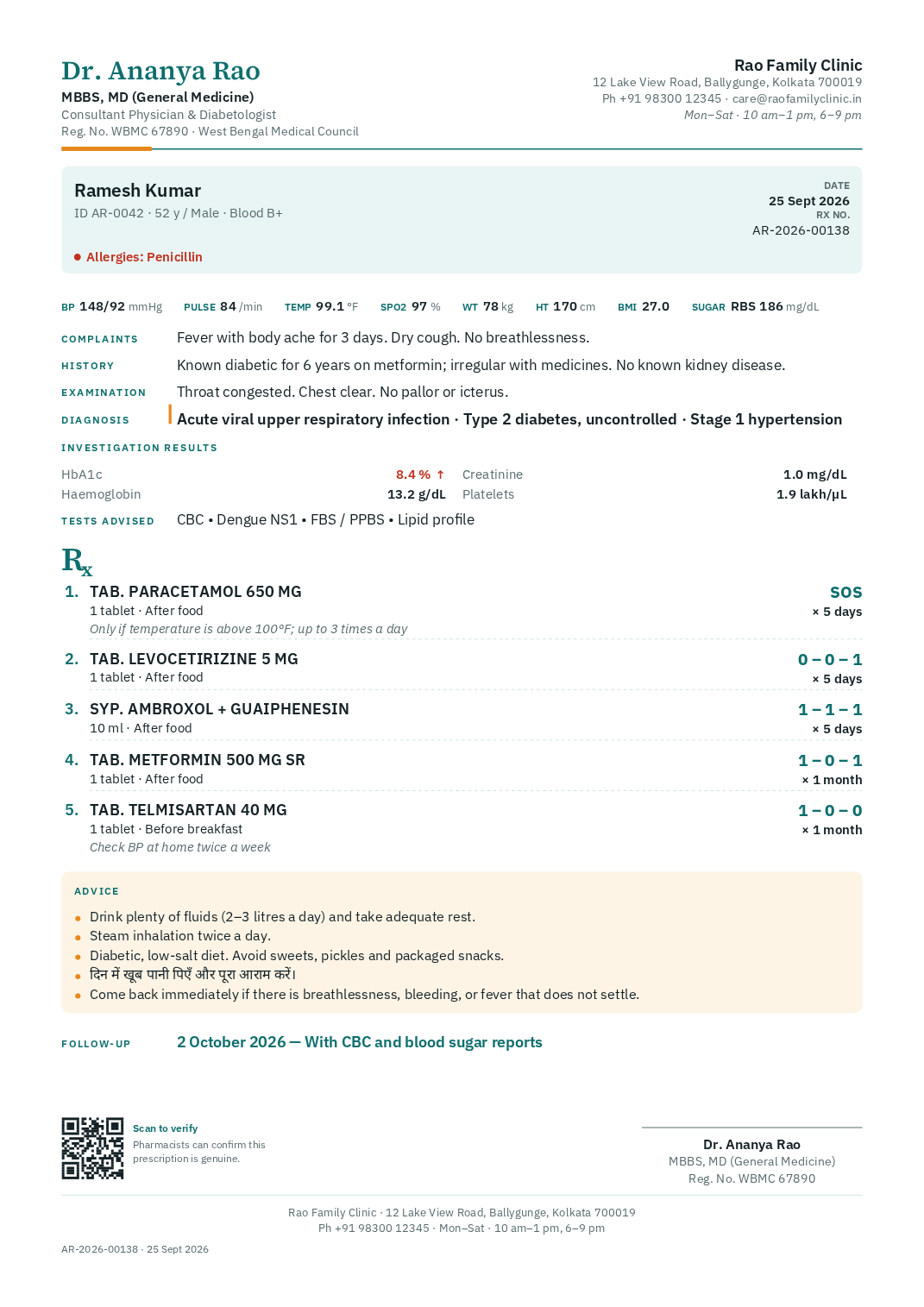
Your pre-printed pad
Only the prescription prints, in the blank space between your printed header and footer. A test page with millimetre rulers lines it up.
A letterhead you made in Canva
Upload the whole page as a PDF or picture and the prescription prints in its white middle, on plain paper.
Compact when it runs long
A long prescription goes compact by itself to fit on one page, nine medicines and all, or every time if you choose.
Indian languages
Hindi, Marathi, Bengali, Assamese, Gujarati, Punjabi, Odia, Tamil, Telugu, Kannada and Malayalam, printed properly beside English, from the patient’s name to the advice.
A pad designed here
Your name, degrees, logo, clinic and up to six texts of your own, such as your timings, arranged by drag and drop across the header and footer.
Any paper size
A4, A5, Letter, half letter, or any size in millimetres.
9 ways to print the medicines
Three clear columns, compact a line each, or a table with the quantity worked out, boxed as on a printed form, or with route and timing.
8 colour sets, 7 fonts
Black and white for laser printers among them, your text size, and your logo or any picture as a faint watermark.
Your signature and stamp
Photograph them, crop and straighten, and the paper background is taken out. At each print, choose your printed signature or a space to sign in ink.
Up to 5 pads
One for each chamber, or A5 for the patient and A4 for the file, picked at each print.
You choose what prints
Vitals, history, the prescription number, compositions, the QR, your name and Reg. No. under the signature. The patient’s mobile stays off unless you turn it on.
A note on every page
Such as when to go to hospital, at the foot of every page, bold in a coloured band if you like.
Blank pads for a power cut
Download your pad with empty sections, to write by hand on a home visit or the day the printer fails.
04Send and consult
On their WhatsApp in one tap.
After a visit, a video call, or an ordinary phone call with a patient you know, the signed prescription reaches their phone with your signature and the verification QR.
Today
Hello Ramesh Kumar, your prescription from Dr. Ananya Rao for your visit on 25 September 2026 is attached.
Replies to this number are not read, so please contact Rao Family Clinic on +91 98300 12345 for any questions.
Sent by RxKite for your doctor7:42 pm
WhatsApp from RxKite’s number
The signed PDF, in your name. Every plan has credits each month, and the send window shows how many are left.
After a phone call
Advise a patient you know on the phone, then sign and send a proper prescription instead of a photo of a slip.
Email, free
From your name, with your signature, stamp and the verification QR. Replies come to your clinic email.
Video calls
Start one from the patient’s page and send the link. It opens in their browser, with no app to install.
Live chat
Patients send photos and PDFs of their reports. When it ends, save the chat to their record or destroy it.
Private by design
Calls and chats go directly between the two devices, encrypted, and are never recorded. The link stops working when you end it.
A QR the chemist can scan
To check the prescription is genuine and not voided, against the record you signed.
05Patients
Every visit on file, under the patient.
Register a patient once. Their history, results and papers are then on one page, and every prescription you wrote opens, prints or sends again.
Ramesh Kumar
AR-0042 · 52 y · M · 98300 12345
Last visit · 7 Nov
- BP
- 148/92
- Pulse
- 84
- Weight
- 78 kg
- Temp
- 99.1 °F
- SpO₂
- 97%
- RBS
- 186
HbA1c Range 4 to 5.6 %
Timeline
- 7 Nov
Prescription AR-2026-00137
Signed · printed at the desk · sent on WhatsApp
- 2 Nov
Lab results · HbA1c, lipid profile
HbA1c 7.2 % High · LDL 112 High
- 28 Oct
Video call · 12 minutes
Reports shared in the chat, saved to the record
- 14 Oct
Echo report.pdf
Attached from the phone camera
The chart at a glance
Last visit’s vitals, the follow-up date and any result out of range, then a timeline of prescriptions, calls, chats, results and papers.
Charted over the years
Every test and vital in one table, out of range in red. Pick one to see it on a chart with its range shaded.
Register once
Only the name is needed. Age as 45 or 3 y 6 m, sex, mobile and allergies take seconds, and fill in every prescription after.
Same name, no mix-ups
Two Seemas on one morning register at once with their own mobiles. A name already on the list, with no mobile to tell them apart, asks first.
Find anyone in seconds
Ctrl + K from anywhere: any part of the name, 3 digits of the mobile, or the patient ID.
IDs and numbers
A patient ID such as SP-0042 on every print, and prescriptions numbered RX-2026-00137.
Lab results in a few taps
+ CBC, + Sugar, + Lipid profile, + KFT, + LFT and + Thyroid add their tests at once, with units and typical ranges. High and Low flag themselves.
Old papers attached
Photograph a report or another doctor’s prescription with the phone or tablet camera. Photos are shrunk, so they do not fill your storage.
Today, ready for you
The follow-ups due today, drafts you have not finished and your recent prescriptions.
Old prescriptions stay as written
If the patient’s age or allergies change later, earlier prescriptions keep what was true on the day.
06Certificates
Certificates, worded for you.
Four ready-made documents, printed on your pad with your signature, stamp and QR, and filed under the patient like a prescription.
Certificates, in the guideNumbered, checkable, not counted
Signed and numbered like a prescription, with a QR an employer can scan that never shows the illness. They do not count against your plan.
Fitness certificate
Fit to resume duty, join service, play sport or travel, from a date.
Sick leave certificate
Rest for a short illness, for work, school or college, between two dates.
Medical leave certificate
The formal wording offices ask for, with a tick box for an extension of leave.
Referral letter
To a specialist or hospital, with the reason, how urgent it is, a clinical summary, the diagnosis, treatment so far and the tests.
Nothing typed twice
Start one from a prescription and the diagnosis comes with it; a referral letter also takes the complaints, findings, vitals, medicines and tests.
07Front desk
Your receptionist, on a login of their own.
When the clinic is busy, the desk registers patients, books them into slots, calls the token on the TV, takes vitals and prints the prescriptions you sign. Working on your own? You never need to set it up.
Standard and Pro, and the trial
Saturday, 7 November
SlotsListRunning about 15 minutes late. Each later slot shows when its patients are now likely to be seen.
Morning · 10:00 am to 1:00 pm · 15 minutes a slot
10:00
Ramesh Kumar
10:15
Meera Ghosh
10:30
Sunita Das
10:45≈ 11:00
Anil Roy
11:00≈ 11:15
Priya Nair
11:15≈ 11:30
Free
11:30≈ 11:45
Arjun Mehta
11:45≈ 12:00
Free
Print AR-2026-00137
Signed by Dr. Ananya Rao on 29 Oct 2026, 10:42 am at Rao Family Clinic. It prints exactly as Dr. Ananya Rao signed it.
Print on
A4 padAssistant logins
2 on Standard, 3 for each clinic on Pro. Invited by email, each with their own password and sign-in code. One login works for several doctors.
TV display with voice calling
A TV in the waiting room shows who is called and who is next. Press Call and it chimes and says the token, in English or ten Indian languages, or speak and it plays your own voice.
Bookings in slots
Your slot length, up to three sessions a day and how many patients a slot, with New or Follow-up marked. Close a weekday, block slots on a date, or book any day up to a year ahead.
Desk printing
Sign in your chamber; the desk prints it exactly as you signed it, with your signature and stamp or a space to sign in ink.
Registration at the door
A new patient in seconds, here now or booked for another day, with the bill opened straight away if you like.
Arrived and waiting, with tokens
Patients wait on your Today in the order they came. Turn on token numbers if your clinic calls patients by number.
Vitals before you see them
BP, pulse, temperature, weight and the rest, entered at the desk and already on the prescription when you open it.
Running late, worked out
When patients wait past their slot, Bookings says how late the clinic is running, and each later slot shows when it is now likely to be seen.
Follow-ups due, in one list
Patients asked back on a day who have not booked are listed beside its slots, to book with one tap.
Changes wait for you
Changing details already entered, cancelling a booking, or printing a prescription older than 30 days waits under Review until you allow it.
You stay in charge
An assistant never writes, changes or signs a prescription, or sees your notes. Everything they do is under their name, and Lock out stops them at once.
08Bills
Bills, part payments and dues, kept straight.
You, or an assistant you allow, give a numbered bill in a few taps. RxKite never handles the money: it keeps the record.
Standard and Pro, and the trial
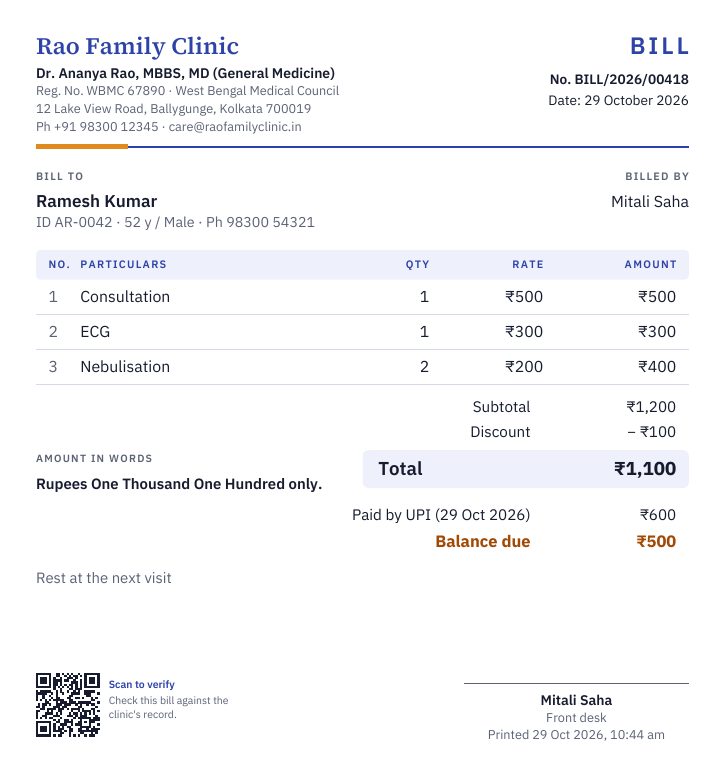
Part paid, the rest due
Cash, UPI or card, in full or in part. What is owed shows on the patient’s page, on Today and under Dues.
The month’s takings
By cash, UPI and card, dues still owed, and two spreadsheets for your accountant.
Your charges, kept once
Up to 500, pasted from a spreadsheet or typed. Star the usual ones for one tap.
Discounts
In rupees or a percent, with a note if you need one.
Dues collected later
At a later visit, against the oldest bills first, with a numbered receipt.
Your logo, and a QR on each
Your clinic’s name, logo and registration number on every bill, and a QR anyone can scan to check it.
Printed or sent
Printed with the name of whoever prints it under the signature line, or sent by email or WhatsApp with your signature.
Never deleted
Only you cancel a bill, with a reason. It keeps its number and is marked cancelled.
09Several clinics
Every chamber you sit in, on one login.
Up to 5 clinics, each with its own front desk and its own pad if you want one.
Pro, and the trial
Rao Family Clinic
Working at
- Rao Family ClinicBallygunge, KolkataPrimary
- Mitra ClinicBehala, Kolkata
- Salt Lake ChamberSector V, Salt Lake
One record per patient
Patients, prescriptions, templates and your medicine list are shared by all your clinics.
Switch in one tap
From the sidebar. Each computer or phone stays at its clinic until you switch.
Each clinic’s own lists
Arrived, booked and registered patients, and the day’s bills, for that clinic.
Assistants where they work
3 logins for each clinic. Each assistant works at all your clinics, or only the ones you tick.
A pad for each, or one for all
Each clinic’s own pad, or one pad that lists every clinic at the top or bottom.
10Trust and data
Records you can rely on.
A prescription is a medical record. It is signed, locked and checkable, and your data stays yours.
How we protect dataSigned means locked
A signed prescription cannot be edited. A wrong one is voided with a reason, and copied into a new draft to correct it.
Nightly encrypted backups
Kept in a separate place from the app, and checked with the tools used to restore them.
Your Reg. No. on every page
Your name, registration number and council, as you entered them.
Checked by QR
The chemist sees the record as you signed it, with the patient’s initials only, and whether it was voided.
Kept for 10 years
The PDF of every signed prescription is kept in storage that refuses any change for at least 10 years.
Two-step sign-in
A code from an authenticator app at every sign-in if you want it, and an emailed code on a new device.
Every device you are signed in on
Listed under Settings, each one signed out with a tap.
Export, or leave
Download every patient, prescription and PDF whenever you like, or delete your account.
No ads, no data selling
Doctors pay; patients never do. Patient data is never used for anything else, AI training included.
Nothing to install. It works in the browser, on a computer, tablet or phone.
Ready in about ten minutes. Your details, your pad, one test print.
A one-minute tour. It shows you where everything is, and the guide covers each step.
Made by a GP. Built by Dr. Shounak Pal, a practising GP in Kolkata. What doctors ask for shapes what comes next.
Try every feature with your own patients.
Start free with 14 days of Pro: templates, the Library, the front desk and bills, all included. No card needed.